Secure your npm and pip package updates in Amazon Linux
July 29, 2026 · AWS Security · Severity: LOW
This AWS Security post explains how to secure npm and pip package updates on Amazon Linux by implementing a dependency cooldown. The cooldown skips packages published in the last 24 hours, reducing exposure to supply chain attacks. It also describes how to override the cooldown for critical security patches.
If you use and install packages from npm or PyPI, the first hours after a package is published are the riskiest because scanners can’t analyze packages before publication. Recent supply chain events affecting NodeJS and Python packages have been detected and removed within hours. However, while those packages were available to the general public, it’s possible that they were installed by users, creating the potential for a security incident. As you will see from the data that follows, if users had waited 1 day before accessing those packages, none of the recent supply chain security events would have had an impact.
In this post, I show you a one-line configuration that you can use to eliminate this exposure in your environment: a dependency cooldown for npm and pip. This change tells your package manager to skip versions published in the last 24 hours, giving the security community time to detect and remove unexpected packages before they reach your systems. These settings secure the default setup. There’s another use case of package updates: receiving security fixes to address security risks. This process involves updating packages to a more recent version. I also show you how to override the cooldown configuration so you can install the latest security patches while newly installed package updates are delayed. We recommend that you assess the severity of code defects and apply security fixes if there’s known risk. Handling security fixes based on their severity—and how to specify SLAs for these fixes based on severity—is beyond the scope of this blog post.
Background: Two risks pull in opposite directions
Software delivered by Amazon Linux packages go through review by Amazon package maintainers and pass guardrails before release. Open source software is developed and maintained with similar processes and guardrails. The npm and PyPI registries have open publishing access and don’t enforce reviews. Unexpected packages are potentially added to the registries because of risks like impersonation or stolen credentials. You’re caught between two risks: older software accumulates unpatched vulnerabilities, while new packages potentially contain unexpected vulnerabilities that haven’t been detected yet. The best approach is to stay current without adopting the newest releases immediately, while applying recommended security fixes. The following diagram illustrates the relation between the two types of risks in an abstract way, where the supply chain risk is highest immediately after a package is published, because unexpected updates can potentially bypass guardrails. After a package is published, auditing can review it and identify potential defects over time. If no security fixes are applied, the risk of all the code defects adds up.
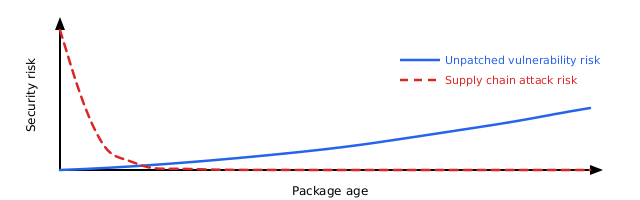
Figure 1: Software risk over lifetime. Unpatched vulnerabilities risk increases over time. Very recent software also carries more supply chain risk.
The problem: The first day presents the highest risk
Supply chain events follow a consistent pattern. An unexpected author publishes an unexpected package or package version and waits for automated systems and users to pull it in. Security researchers and automated scanners typically detect and remove these packages within hours, but by then, systems have been exposed to the risk.
Datadog’s 2026 State of DevSecOps report found that 54% of JavaScript applications install at least one dependency within a day of its release. That’s the time window that presents the highest supply chain risk. Recent events show how fast detection happens:
| Event | Exposure window |
| Nx s1ngularity (Aug 2025) | 4–5 hours |
| axios (Mar 2026) | 2–3 hours |
| Bitwarden CLI (Apr 2026) | 93 minutes |
| TanStack (May 2026) | 30 minutes |
| node-ipc (May 2026) | less than 24 hours |
The solution: Skip packages published today
A dependency cooldown tells your package manager to skip recently published versions. If a version hasn’t existed on the registry for the configured timespan, for example, 1 day, it won’t be installed, giving the security community time to detect and remove unexpected versions.
A 1-day cooldown blocks each event listed in the preceding table. Notably, several of these events produced valid provenance attestations and passed build verification. These provenance checks alone didn’t stop them. A cooldown works independently of authorization mechanisms, because it blocks by age rather than by trust.
Both npm (v11.10.0+) and pip (v26.1+) support cooldowns . Amazon Linux 2023 ships these packages in NodeJS 24 and Python 3.14 since release 2023.11.20260608.
If you use lockfile-based installations through npm ci or pip install -r requirements.txt with pinned versions, you won’t pull latest package updates. The cooldown doesn’t apply to those installations. The cooldown only affects resolution of new or updated packages. See the Lockfile-based installs and the cooldown section for details.
Prerequisites
To implement the following solution, you first need to have the following prerequisites in place:
- Node.js 24 with npm 11.10.0 or later (in nodejs24-24.14.1-1.amzn2023.0.1 or later).
- Python 3.14 with pip 26.1 (in python3.14-pip-26.1.1-1.amzn2023.0.1 or later)
- pip-audit (tool to scan python packages required for defect-based override scripts). Use
python3.14 -m pip install pip-auditto install.
Future versions of Node.js and Python will bring new commands. The following tool commands work for Amazon Linux 2023 with Node.js 24 and Python 3.14. The provided commands target specific package versions. Adjust the commands if you use later releases.
To set up the npm cooldown
- Create the global configuration directory, depending on your NodeJS version.
sudo mkdir -p /usr/lib/nodejs24/etc - Add the npm configuration file with the cooldown setting.
sudo npm-24 config set min-release-age 1 --location=global - Check that the cooldown is active by running the next command.
npm-24 config list
You will see before = "<timestamp from 24 hours ago>" in the output, confirming npm converted the 1-day cooldown into a date filter.
For more information, see the npm min-release-age documentation.
To set up the pip cooldown
- Create the system-wide pip configuration file with the cooldown setting.
sudo python3.14 -m pip config set --global global.uploaded-prior-to P1D - Verify the configuration (for Python 3.14 and pip 26.1+).
python3.14 -m pip config list
You will see global.uploaded-prior-to='P1D' in the output.
Th
Key Takeaways
- Newly published npm and pip packages pose the highest risk in the first hours.
- A one-line dependency cooldown configuration can delay package updates by 24 hours.
- This delay gives the security community time to detect and remove malicious packages.