Propagate user authorization context in AI agents with Amazon Bedrock AgentCore
August 19, 2026 · AWS Security · Severity: LOW
Many teams now deploy AI agents that pull fromAmazon DynamoDBtables, document repositories, software as a service (SaaS) platforms, and internal knowledge bases to answer questions and automate workflows. A key risk in these deployments is that the agent has no awareness of who’s asking, so it might return data the user shouldn’t see. If you’re usingAmazon Bedrock AgentCoreto build AI agents that access multiple data sources, you need each user to see only the data they’re authorized to access. In this post, you learn patterns for propagating user authorization context through your agents so access control is enforced by infrastructure and downstream services, not by agent code. In this post, we show you how to deploy agents that enforce least privilege access without writing authorization logic in the agent itself. This approach followsAGENTSEC03best practice in theAWS Well-Architected Agentic AI Lens. Use caseConsider an example of a customer relationship management (CRM) chat application where employees from Sales and Finance departments interact with an AI agent to access customer information.
Many teams now deploy AI agents that pull from Amazon DynamoDB tables, document repositories, software as a service (SaaS) platforms, and internal knowledge bases to answer questions and automate workflows. A key risk in these deployments is that the agent has no awareness of who’s asking, so it might return data the user shouldn’t see.
If you’re using Amazon Bedrock AgentCore to build AI agents that access multiple data sources, you need each user to see only the data they’re authorized to access. In this post, you learn patterns for propagating user authorization context through your agents so access control is enforced by infrastructure and downstream services, not by agent code. In this post, we show you how to deploy agents that enforce least privilege access without writing authorization logic in the agent itself. This approach follows AGENTSEC03 best practice in the AWS Well-Architected Agentic AI Lens.
Use case
Consider an example of a customer relationship management (CRM) chat application where employees from Sales and Finance departments interact with an AI agent to access customer information. Employees use the same chat interface and the same agent, but each department needs isolated access to their respective data:
- Sales needs access to customer contracts, pricing strategies, and sales pipeline data
- Finance needs access to customer invoices, payment records, and financial reports
The AI agent accesses three types of data sources on behalf of users:
- Customer records in Amazon DynamoDB, partitioned by department
- Department-specific documents in Amazon Bedrock Knowledge Bases (stored in Amazon Simple Storage Service (Amazon S3))
- External CRM data in Salesforce
When a Sales employee asks, “Show me customer contracts,” the agent must retrieve only Sales department contracts, not Finance invoices. This enforcement must happen outside the agent so that even if the agent is compromised through prompt injection or application bugs, it can’t access unauthorized data.
Note: Although we use department-based scoping in this example, the pattern generalizes to any custom claim you define, whether it represents a role, business unit, geographic region, or project assignment.
Architecture overview
The following diagram shows the architecture used in this demonstration.
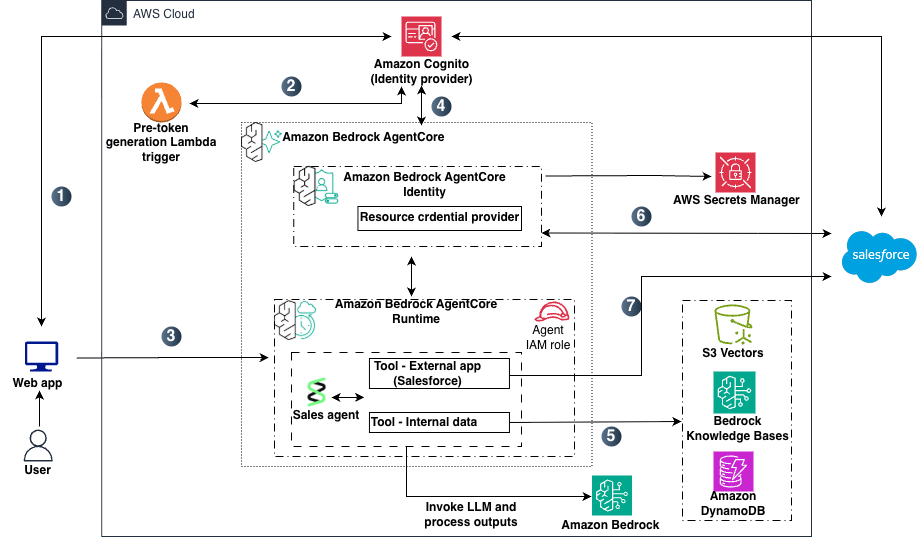
Figure 1: Target architecture
The data flow shown in Figure 1 includes:
- A user opens the chat application and authenticates with Amazon Cognito user pool , which acts as the identity provider (IdP).
- A pre token generation Lambda trigger (V2) enriches the JSON Web Tokens (JWTs) with a custom claim and AWS session tag metadata before returning them to the user.
- The web app routes the user’s request along with the access token to the agent deployed on Amazon Bedrock AgentCore Runtime.
- Bedrock AgentCore Runtime validates the inbound JWT and, through Bedrock AgentCore Identity, issues a workload access token that binds the user and agent identities, and then invokes the agent.
- For queries requiring internal documents, the agent uses its AWS Identity and Access Management (IAM) role to query Amazon Bedrock Knowledge Bases (backed by an Amazon S3 vector store) with metadata filtering, and DynamoDB with user-scoped session-tagged credentials.
- For queries requiring external data, Bedrock AgentCore Identity retrieves credentials from AWS Secrets Manager and performs an on-behalf-of token exchange (RFC 8693) with Salesforce, returning a user-scoped access token.
- The agent calls the Salesforce REST API using the user-scoped token. Salesforce applies sharing rules and returns only records the user is authorized to access.
This architecture follows two key principles.
- The agent acts as an orchestrator, not a gatekeeper; it coordinates tool calls and reasoning but doesn’t control access to data. Authorization is enforced by downstream services.
- The agent doesn’t store credentials to data stores; instead, each request gets temporary, user-bound access tokens.
In the following sections, we dive deep into each data source to show how these principles are achieved in practice.
Initial user authentication with IdP
When an employee opens the chat application, they authenticate using their corporate credentials. For this example, you use Amazon Cognito user pools as the IdP. You can also achieve this with other IdPs such as Entra ID or Okta.
The pre token generation Lambda trigger (V2) captures the user’s custom department context and adds it to the tokens to both the identity (ID) token and access token that Bedrock AgentCore Runtime uses for authorization decisions each serving a distinct purpose. The access token is used by the Bedrock AgentCore Runtime custom JWT authorizer for inbound authorization. The ID token also receive the https://aws.amazon.com/tags claim (used by AWS Security Token Service (AWS STS)) for session tags). The https://aws.amazon.com/tags claim is the specific format required by AWS STS to extract session tags during AssumeRoleWithWebIdentity. For more information and step-by-step guidance see Key Takeaways