Phishing Abuses RMM Tools for Persistent Access
September 29, 2026 · Microsoft Security · Severity: MEDIUM
In this article Attack chain overview Mitigation and protection guidance Learn More In July 2026, Microsoft Defender Experts observed phishing campaigns targeting organizations across multiple industries that distributed a masqueraded MSP360 Remote Monitoring and Management (RMM) installer through meeting invitations, PDF-themed lures, software update prompts, and other social-engineering content. Once executed, the legitimate MSP360 installer, distributed under a deceptive file name established remote management access on affected devices and enabled threat actors to gain an initial foothold using trusted administrative software. Microsoft observed the MSP360 deployment being used to download and install a ConnectWise ScreenConnect client, creating a secondary remote-access channel that provided redundant access to compromised systems. Microsoft did not observe exploitation of ScreenConnect software itself; rather, threat actors abused legitimately obtained remote administration software to establish and maintain access.
In July 2026, Microsoft Defender Experts observed phishing campaigns targeting organizations across multiple industries that distributed a masqueraded MSP360 Remote Monitoring and Management (RMM) installer through meeting invitations, PDF-themed lures, software update prompts, and other social-engineering content. Once executed, the legitimate MSP360 installer, distributed under a deceptive file name established remote management access on affected devices and enabled threat actors to gain an initial foothold using trusted administrative software.
Microsoft observed the MSP360 deployment being used to download and install a ConnectWise ScreenConnect client, creating a secondary remote-access channel that provided redundant access to compromised systems. Microsoft did not observe exploitation of ScreenConnect software itself; rather, threat actors abused legitimately obtained remote administration software to establish and maintain access. After access was established, threat actors used these remote administration channels to deploy additional tools and conduct post-compromise activity, including information collection and credential-access operations.
This activity highlights how threat actors continue to abuse legitimate remote administration software to blend into normal IT operations while maintaining persistent access and reducing detection opportunities. Microsoft Defender for Endpoint detects suspicious and uncommon remote-management activity, while the hunting queries and mitigations in this post can help organizations identify and restrict unapproved RMM use.
Attack chain overview
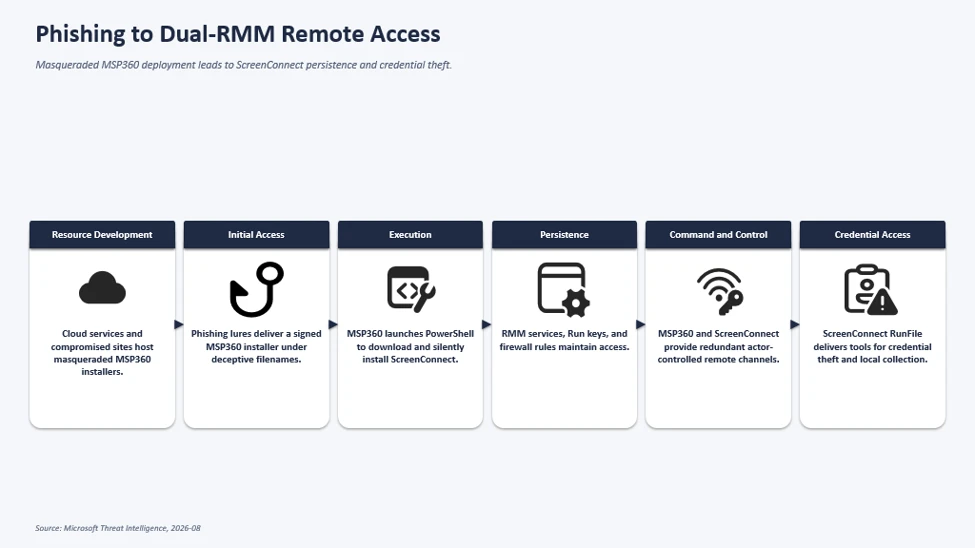
The observed multi-stage intrusion chain began when phishing lures delivered a legitimate, digitally signed MSP360 RMM v2.5.0.67 installer under deceptive filenames. Following successful User Account Control (UAC) elevation, the installer established MSP360 services for persistent access and leveraged the RMM agent to invoke PowerShell, download, and silently install ConnectWise ScreenConnect.
This effectively introduced a second remote administration channel on the compromised device, which the threat actor subsequently used to transfer and execute additional tooling supporting credential access, local data collection, and other post-compromise activity.
Initial Access: Phishing Campaign Delivering Masqueraded MSP360 RMM Installer
Microsoft observed multiple phishing campaigns that used a multi-stage delivery chain to distribute legitimate, digitally signed MSP360 RMM software (v2.5.0.67). Phishing emails directed users to actor-controlled landing pages that impersonated document-sharing portals, invitation workflows, Adobe Reader download pages, Zoom installation pages, and business collaboration platforms.
Upon user interaction, victims were redirected to download locations hosted on both attacker-controlled infrastructure and legitimate cloud services including Amazon S3, Cloudflare R2, Dropbox, GitLab, and Supabase. The downloaded executables used filenames crafted to resemble legitimate business content, meeting invitations, PDF documents, and software installers. Analysis of downloaded samples showed that many ultimately contained the same MSP360 RMM installer package despite appearing as different files to the victim.
MSP360 SHA256: 108ef7e628d7a20bd6241a5b57149e27a6061f467123eb64061975559f8f73dc
MSP360 SHA1: f34330d4c6e0aa978dc3af40360c14b31ad51127
Observed lure themes:
We have observed the threat actor using multiple social-engineering themes, including:
- Workplace meeting requests
- Zoom and Google Meet installation prompts
- Adobe Acrobat and PDF reader updates
- RSVP invitations and e-cards
- Job offer documents
- Document review and signature requests
- DHL and package-delivery themed content
Examples of observed filenames included:
- VIP_ECARD_INVITATION_rmm_v2.5.0.67_oid[redacted].exe
- ZoomSetup_Installation_v2.5.0.67_ oid[redacted].exe
- PDF Reader & Editor the Adobe Acrobatte_rmm_v2.5.0.67_ oid[redacted].exe
- RSVP_INVITATION_E_CARD_rmm_v2.5.0.67_ oid[redacted].exe
- SSA.GOV_STATEMENT_rmm_v2.5.0.67_ oid[redacted].exe
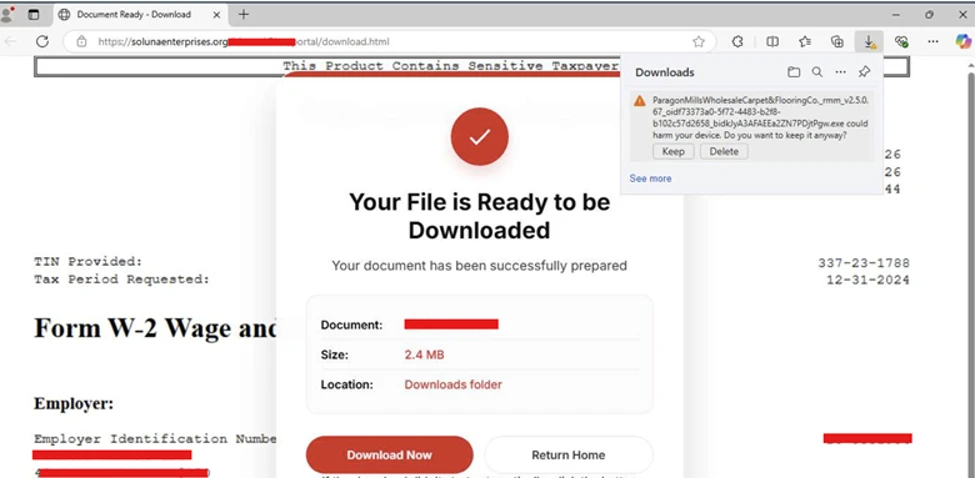
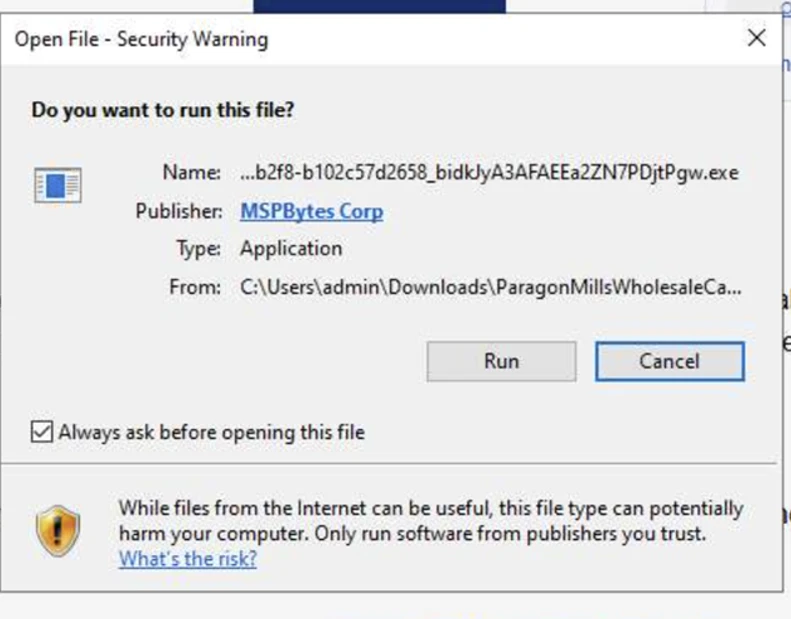
The campaign relied on a diverse set of payload-hosting mechanisms. Microsoft observed the actor distributing the payload through attacker-controlled domains, websites assessed to be compromised, and legitimate cloud-hosted services. Cloud-hosted services used for payload distribution included Amazon S3, Cloudflare R2, Dropbox, GitLab, and Supabase.
This approach enabled the actor to rapidly rotate delivery infrastructure while continuing to distribute the same MSP360 installer using different lure themes and filenames.
RMM platforms are attractive to threat actors because they are designed to provide administrators with broad remote management capabilities across managed endpoints, including remote command execution, software deployment, file transfer, and persistent service-based access. When abused, these same capabilities can give threat actors a flexible post-compromise channel for maintaining access, deploying additional tooling, and conducting follow-on activity while blending in with legitimate remote administration workflows.
MSP360 RMM installation and foothold establishment
After victims downloaded and executed the masqueraded MSP360 installer, the bin
Key Takeaways
- According to Microsoft Security, this development warrants attention from teams monitoring the evolving threat landscape.
- Security teams should review their exposure and implement appropriate defensive controls.
- Security teams should review their exposure and implement appropriate defensive controls.