Managing identity source transition for AWS IAM Identity Center
September 2, 2026 · AWS Security · Severity: MEDIUM
This article provides a guide for managing identity source transitions for AWS IAM Identity Center. It outlines the steps to migrate from one identity source to another while maintaining security and minimizing disruption. The process involves preparing the current setup, switching the identity source in IAM Identity Center, and verifying permissions are correctly mapped. Proper planning ensures users retain access to AWS resources during and after the transition. The article emphasizes testing in a non-production environment before applying changes to production.
September 2, 2026: This post was republished to include Active Directory migration strategies and automation for permission sets.
AWS IAM Identity Center manages user access to Amazon Web Services (AWS) resources, including both AWS accounts and applications. You can use IAM Identity Center to create and manage user identities within the Identity Center identity store or to connect to other identity sources.
Organizations might need to change their identity source configuration as part of a significant transformation to their identity and access management strategy. Common drivers include switching identity providers (IdPs), consolidating identity infrastructure, adopting new single sign-on capabilities, or migrating off legacy on-premises systems. These transitions require planning. A cutover without proper planning can result in temporary loss of access to AWS accounts and applications until assignments are restored..
This blog post walks you through the process of switching from one identity source to another and provides sample code that you can use to assist the transition. It includes architectural guidance and a step-by-step runbook for switching from Active Directory to Okta. This guide helps AWS administrators, identity engineers, and project teams switch identity sources safely.
Note: This walkthrough uses Okta as a representative example of a SAML 2.0 identity provider. The inclusion of Okta in this example does not constitute an endorsement of any specific identity provider.
Identity source options in IAM Identity Center
Each IAM Identity Center instance connects to one identity source at a time. IAM Identity Center supports three main options:
- Identity Center Directory – The default identity store. Users and groups are created and managed directly within IAM Identity Center, with no dependency on an external provider. Suitable for organizations without an existing enterprise directory or those wanting a setup that uses only AWS services.
- Active Directory – Integration with an on-premises Microsoft Active Directory or AWS Managed Microsoft AD through AWS Directory Service. This lets organizations reuse their existing AD identities, group memberships, and access policies.
- External IdP – Integration with third-party providers that support SAML 2.0, including Okta Universal Directory, Microsoft Entra ID (formerly Azure AD), Ping Identity, and others. This is the approach covered in the migration runbook that follows.
The identity source is the definitive system of record: it determines which directory holds the primary copy of user identities and group memberships used for AWS access.
How access flows to AWS resources
IAM Identity Center grants access to AWS resources in two ways, as shown in Figure 1:
- Permission set assignments – Users or groups are assigned permission sets within specific AWS accounts. This enables assume-role access, and AWS Identity and Access Management (IAM) roles (named
AWSReservedSSO_...) are automatically created in each account to back these assignments. - Application assignments – Users or groups are granted access to AWS-managed applications (such as Amazon SageMaker Studio, Amazon OpenSearch Service and so on) and customer-managed applications integrated with IAM Identity Center.
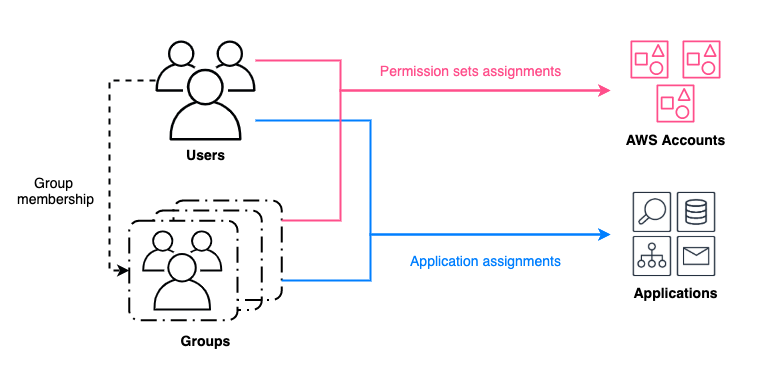
Figure 1: Granting access to AWS resources for users and groups managed by an identity source in IAM Identity Center
When you change the identity source, the downstream impact on these assignments depends heavily on which sources you’re switching from and to. In some transitions, assignments remain intact.
When switching the identity source from Active Directory to an external IdP, all users, groups, and their associated assignments are deleted from IAM Identity Center at the moment of cutover. This is a disruptive scenario, and it makes pre-migration backup and post-migration restoration of assignments essential steps.
What changes when switching identity source in IAM Identity Center
Identity source transitions to or from Active Directory are destructive because users, groups, and all associated assignments are permanently deleted from IAM Identity Center at the moment of cutover. In contrast, transitions between an external identity provider and the local Identity Center directory preserve all users, groups, and assignments, as shown in the following table. For more information, see Considerations for changing your identity source.
| IAM Identity Center item | Status upon switch from AD to external IdP | Status upon switch from external IdP to local identity store |
| Users and groups in Identity Center | Deleted (must be re-provisioned from new source) | Preserved |
| Account assignments | Deleted (must be recreated ) | Preserved |
| Application assignments | Deleted (must be recreated) | Preserved |
Note: For AWS-managed applications that maintain their own identity source reference (such as, SageMaker Studio), the CreateApplicationAssignments API alone might not fully restore access. These applications have dependencies on the original identity sourceID and on specific UserId and GroupId values from the original identity source. They must be restored on a case-by-case basis and might require redeployment. We will cover application migration in part 2 of this blog series.
Sample deployment
The following five-step process applies to an identity source transition in IAM Identity Center from Active Directory to Okta, focusing on permission set assignments. The AD-to-Okta runbook in the next section expands each of these steps with specific instructions and commands. To assist users, you can also use the Identity Center migration tool Key Takeaways