Introducing the Amazon GuardDuty investigation agent: on-demand AI-powered threat assessment
July 20, 2026 · AWS Security · Severity: MEDIUM
AWS has introduced the Amazon GuardDuty investigation agent, a new AI-powered tool now in public preview that automates threat assessments across AWS environments. The agent analyzes security findings from GuardDuty, AWS’s managed threat detection service, and provides structured risk assessments, confidence scores, MITRE ATT&CK technique mappings, and actionable recommendations. It reduces investigation time from hours to minutes by correlating data across multiple tools, accessible via the AWS Management Console, CLI, APIs, or SDKs. Users can scope investigations for specific findings, accounts, or entire organizations, or submit free-form prompts for natural language analysis. The investigation agent leverages cross-region inference for processing while keeping data encrypted and secure. Each assessment delivers a risk level (Info to Critical), confidence score, summary, and remediation steps, including AWS CLI commands. Administrator accounts can initiate investigations for themselves and member accounts, while member accounts can only access their own results. The feature requires GuardDuty activation, an AWS account in a supported region, and IAM permissions (guardduty:CreateInvestigation, GetInvestigation, ListInvestigations). Integration with the AWS MCP server enables AI-assisted security workflows without direct agent management.
The new Amazon GuardDuty investigation agent (now in public preview) investigates security findings across your Amazon Web Services (AWS) environment, reducing investigation time from hours to minutes.
GuardDuty is our managed threat detection service that continuously monitors your AWS accounts and workloads for suspicious, potentially malicious activity, and unauthorized behavior, delivering detailed security findings for visibility and remediation.
Whether you’re investigating a single suspicious finding or assessing security posture across your entire organization, the investigation agent provides structured assessments providing risk levels, confidence scores, and actionable recommendations.
Security teams can spend hours investigating security findings and correlating data across multiple tools. The GuardDuty investigation agent automates this correlation, providing actionable intelligence, built directly into GuardDuty and accessible on demand through the AWS Management Console, AWS Command Line Interface (AWS CLI), AWS APIs, or AWS SDKs.
This post shows you how to:
- Enable the investigation agent in your GuardDuty console.
- Create your first investigation through the console or AWS CLI.
- Use the investigation agent with the AWS MCP server for AI-assisted security operations
Key features of the GuardDuty investigation agent
The GuardDuty investigation agent provides APIs using the same patterns you already know from GuardDuty. Each completed investigation returns a risk level, confidence assessment, MITRE ATT&CK® technique mapping, resource mapping, and prioritized recommendations.
You can scope investigations from the console for a specific finding, an account, or all accounts across your organization. Alternatively, the AWS CLI and API accept a free-form trigger prompt of up to 2,048 characters, so you can describe what to investigate in natural language and guide the analysis of the agent by specifying areas of concern, suspected root causes, or priorities for the investigation.
The investigation agent APIs are also available through the official AWS MCP server, part of the Agent Toolkit for AWS, enabling integration into your existing security toolchains and AI-powered workflows. You don’t need to manage or interact with the agent directly. Call API endpoints, and the agent investigates findings, correlates evidence, and delivers an assessment without the overhead of managing complex configurations.
How the investigation agent analyzes findings
When you create an investigation, the agent uses cross-Region inference to process your findings based on scope and produces a structured output.
Cross-Region inference – GuardDuty investigation uses the Cross-Region Inference Service (CRIS), which selects the optimal AWS Region within your geography to process the investigation assessment. Your data remains stored only in the Region where the investigation request originates. However, investigation data and summary results might be processed outside that Region. Data is transmitted encrypted across the secure network provided by Amazon.
For more information about which inference Regions your request might be routed to see the Cross-Region inference routing table located in the investigation section of the Amazon GuardDuty User Guide.
Investigation output – Each completed investigation produces the following insights: Risk level (Info, Low, Medium, High, or Critical), Confidence (Unknown, Low, Medium, or High), Summary (description of findings and key observations), Investigation Details (additional context), and Recommended Actions (detailed actions including AWS CLI commands).
Account scoping – Account specification is required only when investigating a specific member account. For broader scopes such as your entire organization, no account ID is needed. The agent will only investigate findings within accounts you’re authorized to access per the authorization model that follows.
Prerequisites
Before you get started, make sure you have the following prerequisites in place:
- Amazon GuardDuty enabled in your account
- AWS account in a supported Region (see Availability section)
Required IAM permissions
You will need three new permissions: guardduty:CreateInvestigation to start new investigations, guardduty:GetInvestigation to retrieve results, and guardduty:ListInvestigations to view investigations for a given detector.
Example IAM policy:
Authorization model
Administrator accounts can create investigations, retrieve results, and view investigation lists for themselves and their member accounts. Member accounts can only retrieve results and view investigation lists for their own account. Member accounts can’t create investigations and can’t access investigations belonging to other accounts or the administrator account. Account specification is required only when investigating a specific member account. For your own account or accounts across your organization, no account ID is needed.
To enable and create your first investigation
Before you begin, verify you have the required IAM permissions as described in the prerequisites .
- Open the AWS Management Console in the desired supported Region and navigate to Amazon GuardDuty.
- In the navigation pane, choose Investigations.
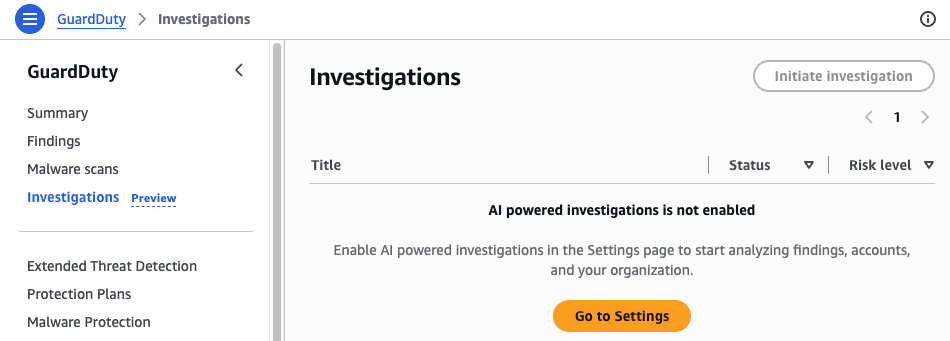
Figure 1: GuardDuty investigation dashboard
- If investigations aren’t enabled choose Go to Settings and then enable investigations by choosing Enable.
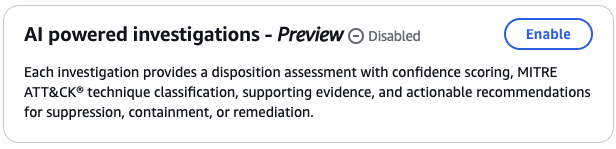
Figure 2: GuardDuty investigations enablement screen
- After investigations are enabled, navigate back to the investigations page.
- In the navigation pane, choose Initiate Investigation.
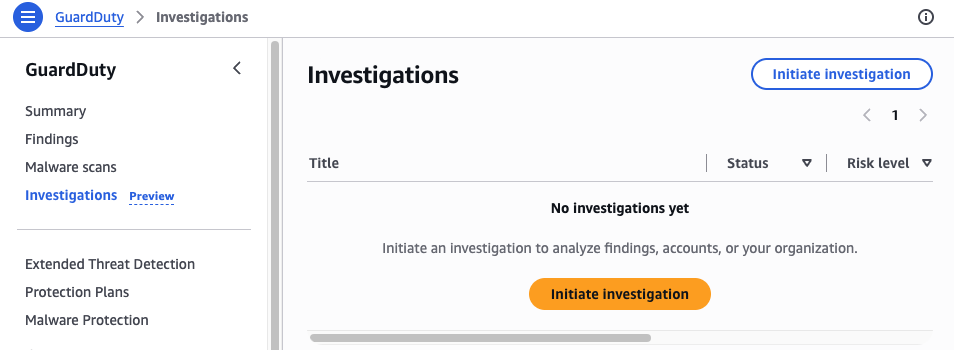
Figure 3: GuardDuty initiate investigation
- Select a scope for your investigation:
Key Takeaways
- Amazon GuardDuty investigation agent reduces investigation time from hours to minutes.
- The AI-powered agent provides risk levels, confidence scores, and recommendations.
- It automates correlation of security findings across AWS environments.