ClickFix moves into the browser: Cryptocurrency theft with Google-hosted C2
September 8, 2026 · Talos Intelligence · Severity: MEDIUM
Cisco Talos is tracking a cryptocurrency-stealing campaign that abuses the Google Visualization API for command and control (C2), retrieving obfuscated JavaScript from a publicly published Google Sheets document and injecting it into the victim's browser session. The actors use a variation on ClickFix social engineering.
- Cisco Talos is tracking a cryptocurrency-stealing campaign that abuses the Google Visualization API for command and control (C2), retrieving obfuscated JavaScript from a publicly published Google Sheets document and injecting it into the victim's browser session.
- The actors use a variation on ClickFix social engineering. Instead of convincing targets to run commands against the operating system, they convince targets to paste JavaScript into the Chrome address bar or install it into the Tampermonkey browser extension, which also provides persistence.
- The lure poses as a leaked vulnerability report describing a nonexistent API flaw at cryptocurrency swap services, and is aimed at users willing to exploit it for financial gain. Talos observed lures distributed through Telegram, DarkForums, and paste sites.
- The injected script functions as a web skimmer. It hooks the browser's fetch API, replaces cryptocurrency deposit addresses in server responses and the user's clipboard, and displays counterfeit "bonus" interface elements.
Cisco Talos has recently observed a criminal campaign that leveraged an interesting twist on what we refer to as “legitimate service abuse.” In this monthslong campaign, the criminal actors used the Google Visualization API as part of a scheme to inject malicious JavaScript into two cryptocurrency trading websites.
This campaign uses a twist on the tactics associated with “ClickFix” social engineering attacks, in which targets are manipulated into copying and pasting PowerShell or other commands and executing them to launch malware. Rather than targeting the victim device’s OS, the actors behind this campaign aim to convince the user to inject malicious code into their own browser session.
Early versions of this campaign began in early October 2025. The social engineering lures used initially focused on getting targets to paste a code snippet directly into the Chrome web browser’s navigation bar; the latest version relies on a legitimate Chrome plugin, Tampermonkey, to inject a loader script pasted in by the user and provide persistence across sessions with the current targeted site.
In March 2026, the actors behind the campaign began using the Google Visualization API to deliver malicious scripts stored in a Google Sheets document. In July, after frequent disruption of their posts on shared text sites, the actors moved to hosting all the components of their campaign in Google Docs and Google Sheets.
So far, the actors behind the scheme have largely targeted individuals who frequent web discussion boards and forums focused on cryptocurrency trading, software development, basic cybersecurity, and hacking. The lure used in the campaign is designed to appeal mostly to would-be cybercriminals looking to make a quick profit off an “API vulnerability” that doesn’t exist to get bigger payouts on cryptocurrency trades.
While this campaign doesn’t pose a specific threat to most organizations, the approaches that the actors here are using do. These techniques and tools could be leveraged in other malware and web attacks with much wider impact, including supply-chain attacks on e-commerce sites and other customer-facing systems.
Just Google it
Google application abuse for C2 is not new by any stretch of the imagination. There have been multiple cases of state-sponsored actors using Google Sheets APIs, Google Drive, and other Google cloud services to help control deployed malware, concealing communications within traffic to otherwise trusted network spaces.
Hunting for these threats usually requires examination of DNS traffic and the processes that are making the requests to reach these destinations — like a random executable making a DNS request for “docs.google[.]com”. But when the requests are made from within a browser session, that makes detection much more difficult.
The Google Visualization API is a feature of Google Docs that is almost as old as the platform itself. Initially introduced in 2008, the API provides free, unauthenticated read-only access to the contents of any Google Sheets spreadsheet that has been publicly published to the web via queries embedded in a URI. These queries result in delivery of data from within the spreadsheet in JSON format or as an HTML table.
A Visualization API request URI looks like this:
https[:]//docs.google[.]com/spreadsheets/d/[document identifier] /gviz/tq?[query language input formatted for HTTP]
The API’s query language is very similar to Structured Query Language (SQL). For example, to get all of the content from a sheet’s column B returned as a JSON object, the query portion of the URI would be:
/gviz/tq?tqx=out:json&tq=SELECT%20B
API responses in JSON are returned in the format like the one below, ready to be parsed by the calling JavaScript application:
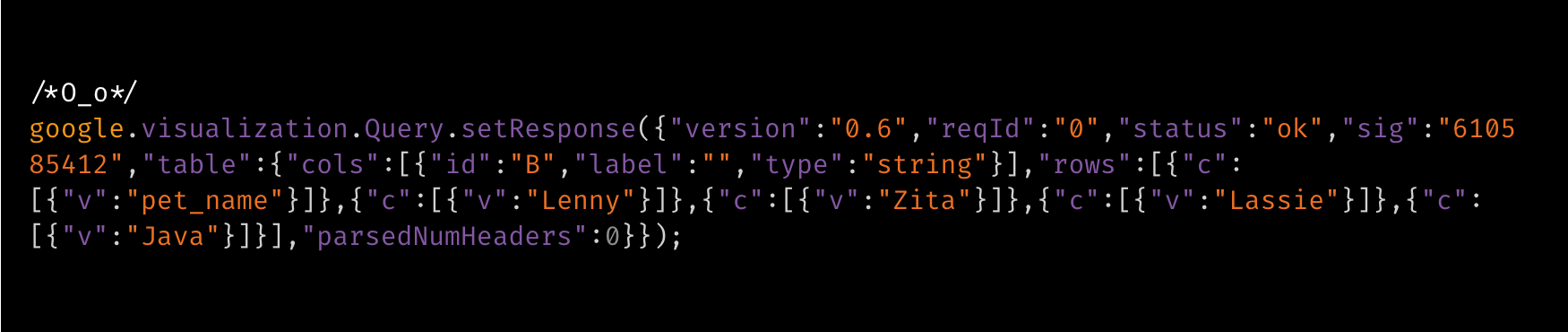
This is a read-only API, so it can’t be used by an application to alter the data in the spreadsheet. However, an application could append to the data to a spreadsheet connected to a Google Forms page by sending an HTML POST request. Presto! A full C2 system hidden within HTTPS traffic to a trusted domain.
The campaign Talos observed used the Visualization API to retrieve two cells from a remote spreadsheet containing obfuscated JavaScript, which were injected into the web browser session of a target. Used in combination with other abused legitimate services, the actors behind this campaign could modify the query used to change which cells were retrieved and injected, or if necessary change the spreadsheet targeted by the query — which they did after we disrupted their operations the first time.
Phishing for sharks
The actors behind this scheme are looking for a very specific kind of mark: someone who is willing to commit fraud using technical means that they don’t clearly understand. Early versions of their phishing campaign documented by researchers used email, carrying links to a Google Docs document purportedly leaked security report. Actors also used comments on Pastebin and other text-sharing sites and direct messages in various forums to post links to versions of the Docs file.
In January, operators of the most recent incarnation of the scheme set up a Telegram account to facilitate the scam. The Telegram channel only allows posts from the channel administrator, and the threat actors delete older posts each time a new version of the lure is published to disguise the fact that they’re essentially just reposting the same fictional “exploit” over and over again.
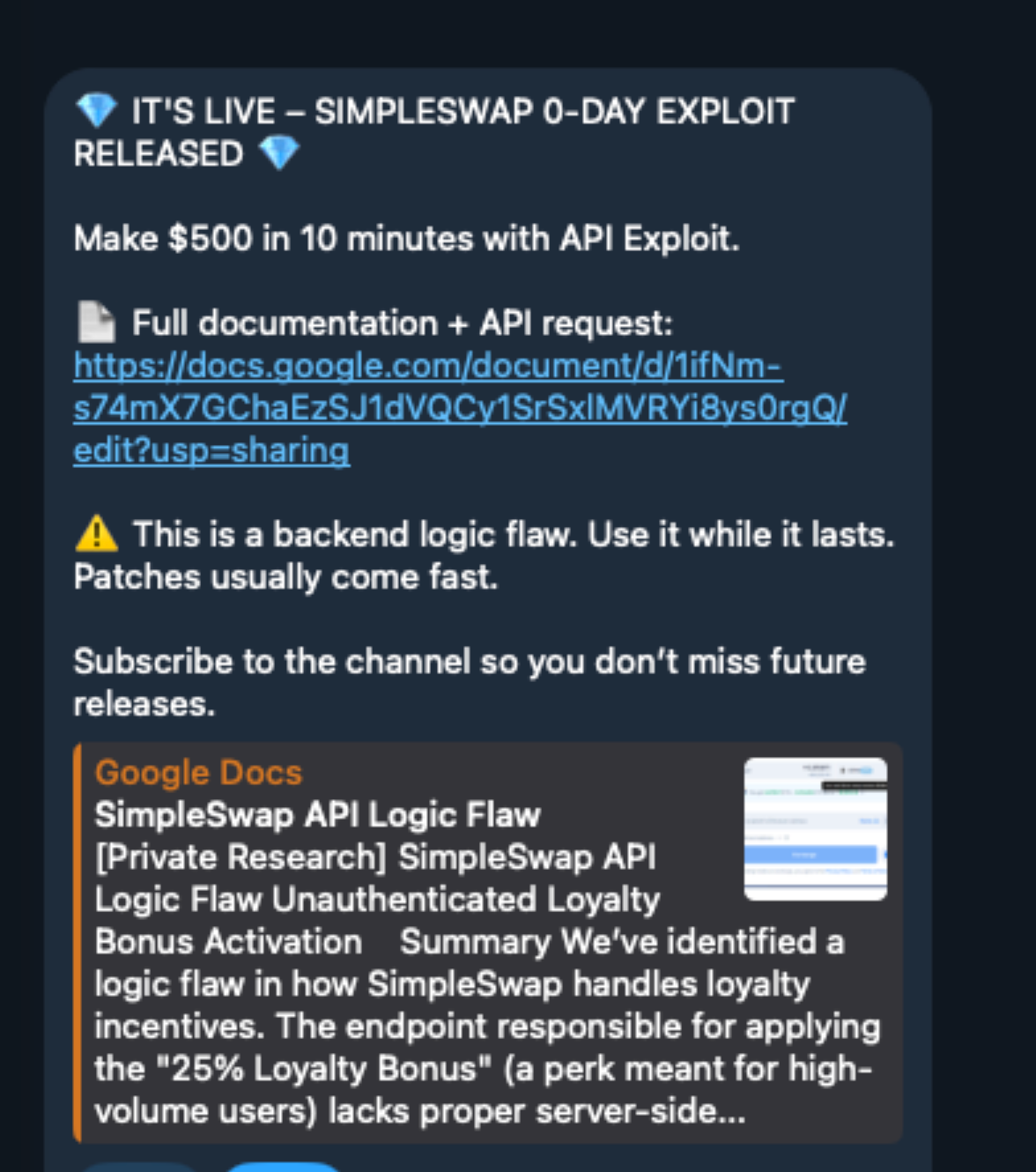
Talos found multiple lures related to this Telegram channel posted in dark web forums, including the cybercrime-focused DarkForums. Lures were also posted in the comments on text files shared on Pastebin and a number of other text-sharing sites. Some (like the one above) directed recipients to a Telegram channel, while others linked directly
Key Takeaways
- A cryptocurrency-stealing campaign abuses the Google Visualization API for command and control via publicly published Google Sheets documents.
- Attackers use a ClickFix variant that operates entirely within the victim's browser, retrieving obfuscated JavaScript from Google-hosted C2 infrastructure.
- The campaign demonstrates how threat actors weaponize legitimate Google services to host malicious payloads and evade detection.