Automate certificates with ACME support in AWS Certificate Manager
August 6, 2026 · AWS Security · Severity: LOW
AWS Certificate Manager now supports the ACME protocol, enabling automation of public certificate issuance and renewal using familiar tools like certbot and cert-manager. This addresses the operational challenge of managing thousands of certificates as validity periods shrink to 100 days by 2027 and 47 days by 2029. Certificates are registered in ACM for unified inventory management across AWS, on-premises, and hybrid environments.
Customers tell us that managing TLS certificates at scale is one of their biggest operational concerns. The Certification Authority Browser Forum (CA/Browser Forum) has mandated a phased reduction in maximum certificate validity for public certificates. By March 2027, the maximum validity drops to 100 days. By March 2029, it lasts for 47 days. For an organization managing 1,000 certificates, the final transition means roughly 30 renewal events every day. Renewal and rotations of renewed certificates at that cadence isn’t something manual processes or ticket-driven workflows can sustain at scale.
We recently announced Automated Certificate Management Environment (ACME) protocol support in AWS Certificate Manager (ACM). With this launch, you can use the ACME clients your teams already know, including popular open source tools like certbot, cert-manager, acme.sh, and win-acme, to automate public certificate issuance and renewal for your infrastructure. Customers that are using third-party certificate authorities (CAs) can point their existing ACME-compatible clients at ACM instead of their current CA, with minimal reconfiguration. This applies whether it’s running on Amazon Web Services (AWS), on premises, or in a hybrid environment. Certificates created through ACME are registered in ACM, giving you a unified view of your entire certificate inventory.
This post covers how the feature works, how to get started, and the controls and best practices to help you manage certificate issuance at scale.
Background
ACME is an open source protocol that automates the process of verifying domain ownership and issuing certificates and has become a standard mechanism for certificate automation. While ACM has long provided managed certificate issuance and renewal for AWS-integrated services such as Elastic Load Balancing (ELB), Amazon CloudFront, and Amazon API Gateway, many customers also need to automate certificates for their own infrastructure, including servers they manage in their data centers, Kubernetes clusters, Internet of Things (IoT) fleets, and hybrid environments. Until now, those customers had to turn to external providers. This launch brings the ACM automation model to that same infrastructure, using the standard ACME protocol with AWS managed certificate endpoints.
How it works
The feature introduces a new centrally provisioned and managed resource type: the ACME endpoint. Each endpoint is an AWS resource with a unique ACME directory URL and AWS Identity and Access Management (IAM)-based access controls. You create and manage endpoints through the ACM API or AWS Management Console, and point your existing ACME clients at the endpoint URL. Certificates issued through your endpoint are automatically registered with ACM, appearing in your certificate inventory alongside certificates created by the RequestCertificate and ImportCertificate API calls.
The architecture separates into two planes. In the control plane, PKI administrators use ACM APIs to create ACME endpoints, pre-approve the domains an endpoint is allowed to issue for, and generate external account binding (EAB) credentials. In the data plane, ACME clients register with an endpoint using EAB credentials and request certificates for domains the administrator has already validated. This architecture is how we provide customers the ability to scale. Instead of each client proving domain ownership on every request, a principal with appropriate ACM permissions (typically your PKI administrator) validates domains once at the endpoint level, and then application owners don’t need DNS credentials to get a certificate.
Adding to the data plane, EABs control client access to the endpoints. Each EAB is bound to an IAM role that controls what certificate operations the ACME client can perform, and credentials you generate in ACM are distributed to authorized ACME clients. An ACME client authorized for one endpoint can’t use a different endpoint. This creates security boundaries between environments. For example, a client authorized for your development endpoint can’t obtain certificates from your production endpoint.
Figure 1 shows the ACME request flow through ACM. An ACME client authenticates to an ACME endpoint using EAB credentials. The endpoint routes certificate orders to Amazon Trust Services for issuance. Issued certificates are registered in ACM inventory, where Amazon EventBridge and AWS CloudTrail provide expiration alerting and audit logging.
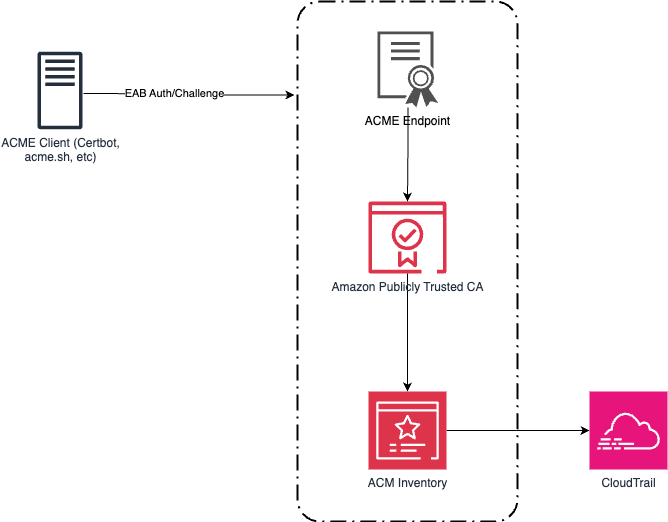
Figure 1: An ACME architecture and workflow
Getting started
Getting started with the new ACME feature in ACM is straightforward. Use the following steps to create your first ACME-generated certificate.
Prerequisites
- An AWS account with permissions to create and manage ACM resources
- An ACME client installed on your infrastructure (for example, Certbot, cert-manager, acme.sh, or others)
- AWS Command Line Interface (AWS CLI) installed on your device (see this blog post for the console equivalent)
- Amazon Route 53 hosted zone for your domain, or the ability to create a CNAME record with your DNS provider
Step 1: Create an ACME endpoint
Before you can use ACME clients with ACM, you need to create an ACME endpoint. This endpoint provides the URL that your ACME clients will use to request certificates.
- Run the following command from the AWS CLI to create an ACME endpoint:
- Note the endpoint Amazon Resource Name (ARN) from the response.
- Run the following command to retrieve the endpoint URL, replacing the ARN with your endpoint ARN:
- Save the output of the ACME
EndpointUrl: